Graph
Graph which can display plots. More...
Data Structures | |
| struct | gui_graph_data_t |
| Graph data widget structure. More... | |
| struct | gui_graph_t |
| Graph widget structure. More... | |
Typedefs | |
| typedef struct gui_graph_data * | gui_graph_data_p |
Enumerations | |
| enum | gui_graph_color_t { GUI_GRAPH_COLOR_BG = 0x00, GUI_GRAPH_COLOR_FG = 0x01, GUI_GRAPH_COLOR_BORDER = 0x02, GUI_GRAPH_COLOR_GRID = 0x03 } |
| Graph color list enumeration. More... | |
| enum | gui_graph_border_t { GUI_GRAPH_BORDER_TOP = 0x00, GUI_GRAPH_BORDER_RIGHT = 0x01, GUI_GRAPH_BORDER_BOTTOM = 0x02, GUI_GRAPH_BORDER_LEFT = 0x03 } |
| Graph border list enumeration. More... | |
| enum | gui_graph_type_t { GUI_GRAPH_TYPE_YT = 0x00, GUI_GRAPH_TYPE_XY = 0x01 } |
| Graph type enumeration. More... | |
Functions | |
| gui_handle_p | gui_graph_create (gui_id_t id, float x, float y, float width, float height, gui_handle_p parent, gui_widget_evt_fn evt_fn, uint16_t flags) |
| Create new graph widget. More... | |
| uint8_t | gui_graph_setcolor (gui_handle_p h, gui_graph_color_t index, gui_color_t color) |
| Set color to specific part of widget. More... | |
| uint8_t | gui_graph_setminx (gui_handle_p h, float v) |
| Set minimal X value of plot. More... | |
| uint8_t | gui_graph_setmaxx (gui_handle_p h, float v) |
| Set maximal X value of plot. More... | |
| uint8_t | gui_graph_setminy (gui_handle_p h, float v) |
| Set minimal Y value of plot. More... | |
| uint8_t | gui_graph_setmaxy (gui_handle_p h, float v) |
| Set maximal Y value of plot. More... | |
| uint8_t | gui_graph_setaxes (gui_handle_p h, float min_x, float max_x, float min_y, float max_y) |
| Set all axes. More... | |
| uint8_t | gui_graph_zoomreset (gui_handle_p h) |
| Reset zoom of widget. More... | |
| uint8_t | gui_graph_zoom (gui_handle_p h, float zoom, float x, float y) |
| Zoom widget display data. More... | |
| uint8_t | gui_graph_attachdata (gui_handle_p h, gui_graph_data_p data) |
| Attach new data object to graph widget. More... | |
| uint8_t | gui_graph_detachdata (gui_handle_p h, gui_graph_data_p data) |
| Detach existing data object from graph widget. More... | |
| gui_graph_data_p | gui_graph_data_create (gui_id_t id, gui_graph_type_t type, size_t length) |
| Creates data object according to specific type. More... | |
| uint8_t | gui_graph_data_addvalue (gui_graph_data_p data, int16_t x, int16_t y) |
| Add new value to the end of data object. More... | |
| uint8_t | gui_graph_data_setcolor (gui_graph_data_p data, gui_color_t color) |
| Set color for graph data. More... | |
| gui_graph_data_p | gui_graph_data_get_by_id (gui_handle_p graph_h, gui_id_t id) |
| Get data collection with specific ID from graph. More... | |
Detailed Description
Graph which can display plots.
Graph widget to display plot lines of 2 different types, either XY or YT.
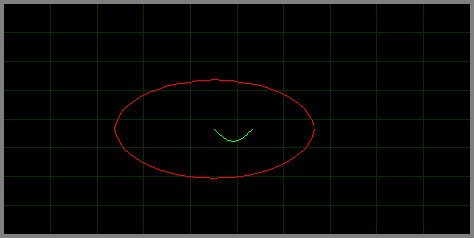
Graph widget with 2 data plots. Red is XY and green is YT
Example code for image above
Typedef Documentation
◆ gui_graph_data_p
| typedef struct gui_graph_data* gui_graph_data_p |
Graph data pointer
Enumeration Type Documentation
◆ gui_graph_border_t
| enum gui_graph_border_t |
◆ gui_graph_color_t
| enum gui_graph_color_t |
Graph color list enumeration.
- See also
- gui_graph_setcolor
◆ gui_graph_type_t
| enum gui_graph_type_t |
Function Documentation
◆ gui_graph_attachdata()
| uint8_t gui_graph_attachdata | ( | gui_handle_p | h, |
| gui_graph_data_p | data | ||
| ) |
Attach new data object to graph widget.
- Parameters
-
[in,out] h Graph widget handle [in] data Data object handle
- Returns
1on success,0otherwise
◆ gui_graph_create()
| gui_handle_p gui_graph_create | ( | gui_id_t | id, |
| float | x, | ||
| float | y, | ||
| float | width, | ||
| float | height, | ||
| gui_handle_p | parent, | ||
| gui_widget_evt_fn | evt_fn, | ||
| uint16_t | flags | ||
| ) |
Create new graph widget.
- Parameters
-
[in] id Widget unique ID to use for identity for callback processing [in] x Widget Xposition relative to parent widget[in] y Widget Yposition relative to parent widget[in] width Widget width in units of pixels [in] height Widget height in units of pixels [in] parent Parent widget handle. Set to NULLto use current active parent widget[in] evt_fn Custom widget callback function. Set to NULLto use default callback[in] flags flags for create procedure
- Returns
- Widget handle on success,
NULLotherwise
◆ gui_graph_data_addvalue()
| uint8_t gui_graph_data_addvalue | ( | gui_graph_data_p | data, |
| int16_t | x, | ||
| int16_t | y | ||
| ) |
Add new value to the end of data object.
- Parameters
-
[in] data Data object handle [in] x X position for point. Used only in case data type is GUI_GRAPH_TYPE_XY, otherwise it is ignored [in] y Y position for point. Always used no matter of data type
- Returns
1on success,0otherwise
◆ gui_graph_data_create()
| gui_graph_data_p gui_graph_data_create | ( | gui_id_t | id, |
| gui_graph_type_t | type, | ||
| size_t | length | ||
| ) |
Creates data object according to specific type.
- Note
- Data type used in graph widget is 2-byte (short int)
-
When
- GUI_GRAPH_TYPE_XY is used, 2 * length * sizeof(short int) of bytes is allocated for X and Y value
- Parameters
-
[in] id Graph data ID [in] type Type of data. According to selected type different allocation size will occur [in] length Number of points on plot.
- Returns
- Graph data handle on success,
NULLotherwise
◆ gui_graph_data_get_by_id()
| gui_graph_data_p gui_graph_data_get_by_id | ( | gui_handle_p | graph_h, |
| gui_id_t | id | ||
| ) |
Get data collection with specific ID from graph.
- Parameters
-
[in] graph_h Graph widget handle [in] id Data collection ID
- Returns
- Data collection handle
◆ gui_graph_data_setcolor()
| uint8_t gui_graph_data_setcolor | ( | gui_graph_data_p | data, |
| gui_color_t | color | ||
| ) |
Set color for graph data.
- Parameters
-
[in,out] data Graph data handle [in] color New color for data
- Returns
1on success,0otherwise
◆ gui_graph_detachdata()
| uint8_t gui_graph_detachdata | ( | gui_handle_p | h, |
| gui_graph_data_p | data | ||
| ) |
Detach existing data object from graph widget.
- Parameters
-
[in,out] h Graph widget handle [in] data Data object handle
- Returns
1on success,0otherwise
◆ gui_graph_setaxes()
| uint8_t gui_graph_setaxes | ( | gui_handle_p | h, |
| float | min_x, | ||
| float | max_x, | ||
| float | min_y, | ||
| float | max_y | ||
| ) |
Set all axes.
- Parameters
-
[in] h Widget handle [in] min_x,max_x,min_y,max_y New coordinate maximum values
- Returns
1on success,0otherwise
◆ gui_graph_setcolor()
| uint8_t gui_graph_setcolor | ( | gui_handle_p | h, |
| gui_graph_color_t | index, | ||
| gui_color_t | color | ||
| ) |
Set color to specific part of widget.
- Parameters
-
[in] h Widget handle [in] index Color index [in] color Color value
- Returns
1on success,0otherwise
◆ gui_graph_setmaxx()
| uint8_t gui_graph_setmaxx | ( | gui_handle_p | h, |
| float | v | ||
| ) |
Set maximal X value of plot.
- Parameters
-
[in] h Widget handle [in] v New maximal X value
- Returns
1on success,0otherwise
◆ gui_graph_setmaxy()
| uint8_t gui_graph_setmaxy | ( | gui_handle_p | h, |
| float | v | ||
| ) |
Set maximal Y value of plot.
- Parameters
-
[in] h Widget handle [in] v New maximal Y value
- Returns
1on success,0otherwise
◆ gui_graph_setminx()
| uint8_t gui_graph_setminx | ( | gui_handle_p | h, |
| float | v | ||
| ) |
Set minimal X value of plot.
- Parameters
-
[in] h Widget handle [in] v New minimal X value
- Returns
1on success,0otherwise
◆ gui_graph_setminy()
| uint8_t gui_graph_setminy | ( | gui_handle_p | h, |
| float | v | ||
| ) |
Set minimal Y value of plot.
- Parameters
-
[in] h Widget handle [in] v New minimal Y value
- Returns
1on success,0otherwise
◆ gui_graph_zoom()
| uint8_t gui_graph_zoom | ( | gui_handle_p | h, |
| float | zoom, | ||
| float | x, | ||
| float | y | ||
| ) |
Zoom widget display data.
- Parameters
-
[in] h Widget handle [in] zoom Zoom coeficient. Use 2.0fto double zoom, use0.5fto unzoom2times, etc.[in] x X coordinate on plot where zoom focus will apply. Valid value between 0and1relative to width area. Use0.5fto zoom into center area[in] y Y coordinate on plot where zoom focus will apply. Valid value between 0and1relative to height area. Use0.5fto zoom into center area
- Returns
1on success,0otherwise
◆ gui_graph_zoomreset()
| uint8_t gui_graph_zoomreset | ( | gui_handle_p | h | ) |
Reset zoom of widget.
- Parameters
-
[in] h Widget handle
- Returns
1on success,0otherwise